Highlights of the licensing mechanism in SuperLab:
Click on the Help menu and choose License. The following dialog (screen) will appear:
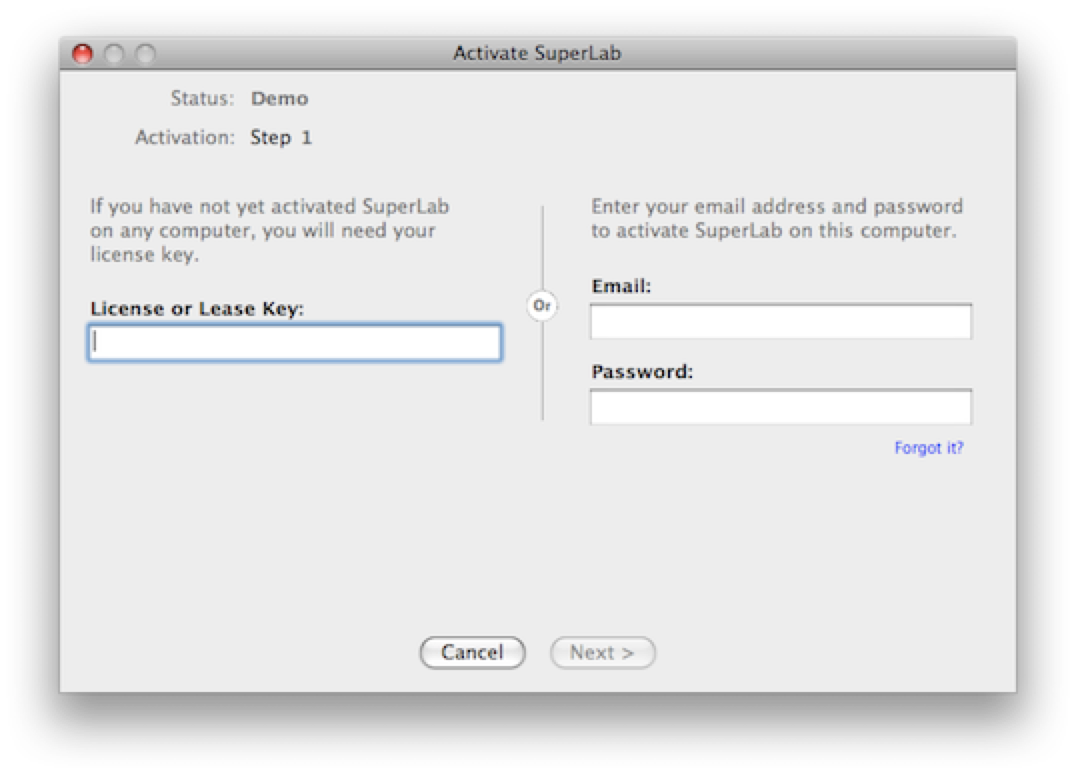
If you have not activated SuperLab on any computer before:
If you have previously activated a SuperLab 4.5 (or later) license, enter the email address and password, click on Next, and follow the on-screen instructions.
When the activation period ends, SuperLab will prompt you to enter your password. It’s that simple.
To create a lease, click on the Help menu and choose Create Leases. If you have purchased two or more “seats”, you can lease the unused seats to others for a duration of your choice.
To view license activity, click on the Help menu and choose My License Activity again (menu item was labeled License on earlier versions).
Please contact us if you run into a problem.
It is asking me to specify a duration. Is this for a trial?
No! It is the full program.
What happens when the activation period expires?
You can easily reactivate it, either on the same computer by simply re-entering your password, or on another computer altogether.
If I cannot deactivate, how do I move my license to a different computer?
Once the activation period ends, you can then activate SuperLab on a different computer.
How long should I activate for?
For as long as you plan to be on that particular computer. Remember, you can always reactivate, and for as many times as you want. The maximum is one year.
Can I try it first?
Sure. Activate for just one day to see how it works.
Can I see how many computers I have activated SuperLab on?
Yes. From within SuperLab, click on the Help menu and choose My Licensing Activity…. To maintain security, you need to enter your account password and then click on the Show History button.
Or contact us to schedule
a demo.
PRODUCTS
SUPPORT
STAY IN TOUCH


© Copyright 2026 Cedrus Corporation, P.O. Box 6309, San Pedro, CA 90734 - USA
Phone: +1-310-548-9595. Send us an email
qwerasdf



