The Lumina LSC-400 (and LSC-400B) controller includes an Accessory Connector that offers up to six I/O (input/output) lines. These I/O lines can be used to connect external peripherals such as additional keys or a foot pedal, or to obtain a TTL output of the built-in keys. This document describes the software and electrical features of the Accessory Connector.
The Accessory Connector uses an RJ45 jack. This is the same type of jacks used in Ethernet wiring, making it easier for find and buy matching cables in a wide variety of lengths and colors.

You can draw a maximum of 10 milliamps per pin from the Accessory Connector, and a combined maximum of 50 milliamps total.
The RJ45 jack has eight pins. One is ground. Another is positive voltage. The remaining six are I/O lines. The table below describes the pin assignments. Pin 1 is the leftmost pin when you are looking at the connector.
Pin
Line
Function
1
Line AC1 (leftmost pin)
Button 1 (blue)
2
Line AC2
Button 2 (yellow)
3
Line AC3
Button 3 (green)
4
Line AC4
Button 4 (red)
5
Line AC5
Scanner trigger (connected to the BNC connector on the back of the controller)
6
Line AC6
“OR” line: AC6 is activated when any of the buttons are pressed
7
+5 volt ±5%
8
Ground (rightmost pin)
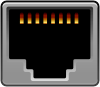
Accessory Connector
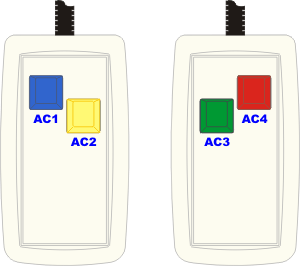
The information in the table above applies when the Accessory Connector is set to Reflective mode; this is the default mode when the system ships.
Last revision: March 19, 2004
PRODUCTS
SUPPORT
STAY IN TOUCH


© Copyright 2026 Cedrus Corporation, P.O. Box 6309, San Pedro, CA 90734 - USA
Phone: +1-310-548-9595. Send us an email
qwerasdf
