The information in this article applies to owners of an RB-420, RB-520, RB-620, or RB-820 response pad who want to use it with E-Prime or MEL Professional.
A built-in feature in the RB-x20 response pads gives them the ability to emulate the PST Serial Response Box Model 200A, shown on the right. This feature enables the response pad to seamlessly work with PST’s E-Prime or MEL Professional software. This document shows you how to enable this feature.
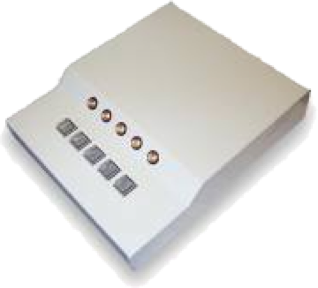
Placing your RB-x20 response pad in SRB Model 200A mode is a simple matter of flipping a switch or two.
Take a look at the back of your response pad, illustrated below. You will find three things (from left to right): the Accessory Connector for plugging external peripherals; a set of four switches; and the serial port for connecting your response pad to the computer.

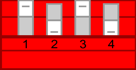
When shipped, all four switches are in the down position. This is the “RB Series” mode running at 19200 baud. To place the response pad in SRB Model 200A mode, you need to flip switch 1 (the leftmost one) UP. You can change the baud rate (speed) by flipping switch 3. The following illustrations show the only two switch combinations that apply for emulating the SRB Model 200A:
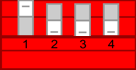
SRB Model 200A Mode at 19200 baud (only switch 1 is UP)
SRB Model 200A Mode at 9600 baud (switches 1 and 3 are UP)
The baud rate that you select should match the baud rate setting in E-Prime or MEL Professional. If you are not sure which one it is, try both combinations.
Important: An RB-x20 response pad “reads” the switch positions only when it is first turned on. For changes to take effect after you flip a switch, you must unplug the serial cable from the response pad, wait a few seconds, and then plug it back in.
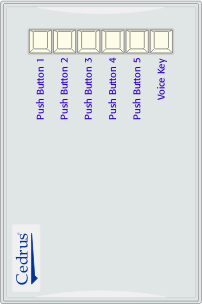
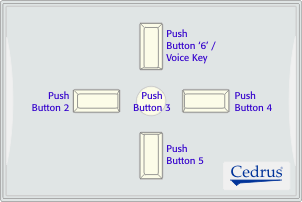
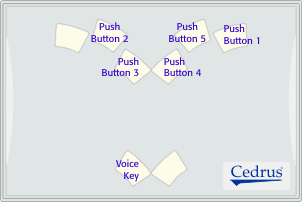
The SRB Model 200A has five push buttons and voice key. Here is how they correspond to the various RB-x20 models:
RB-420
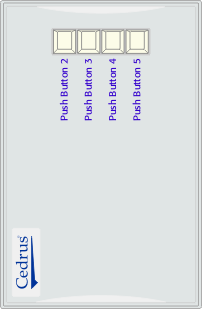
RB-620
RB-520
RB-820
To use an RB-x20 response pad with MEL or E-Prime, you need to follow those products’ instructions for using the PST Serial Response Box Model 200A.
The RB-x20 response pads use a low power microprocessor and yet do not require a battery or A/C adapter. They draw just enough power from the serial port to operate. For this reason, you need to observe the following two points:
1.
The PST SRB Model 200A has lamps whereas the RB-x20 response pads do not. DO NOT send commands to an RB-x20 response pad to turn lamps on or off! This will cause errors when a button is pressed because the pads use the incoming data line to draw some power.
2.
You must use a serial cable that has all the wires running through. This is typically referred to as a “modem cable” (as opposed to a “printer cable”). The cable that came with your pad is a modem cable.
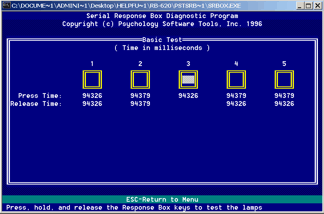
The PST SRBOX utility program, pictured on the right, does not always work well with the RB-x20 response pads. The reason is simple: when you press a push button, the SRBOX program turns on the corresponding lamp to provide feedback. This trips the response pad. You can still use this program to determine that you have the correct COM port and speed.
Last revision: October 21, 2003
PRODUCTS
SUPPORT
STAY IN TOUCH


© Copyright 2026 Cedrus Corporation, P.O. Box 6309, San Pedro, CA 90734 - USA
Phone: +1-310-548-9595. Send us an email
qwerasdf
