Cedrus logo

Support   SuperLab    Behavioral Data File Format (version 6 or earlier)

‍When running an experiment, SuperLab 6 saves the behavioral data in a plain text file with fields separated by tabs. This makes it easy to import into a spreadsheet or to write custom software to parse it. And of course, you can always use Data Viewer.

‍The File Format

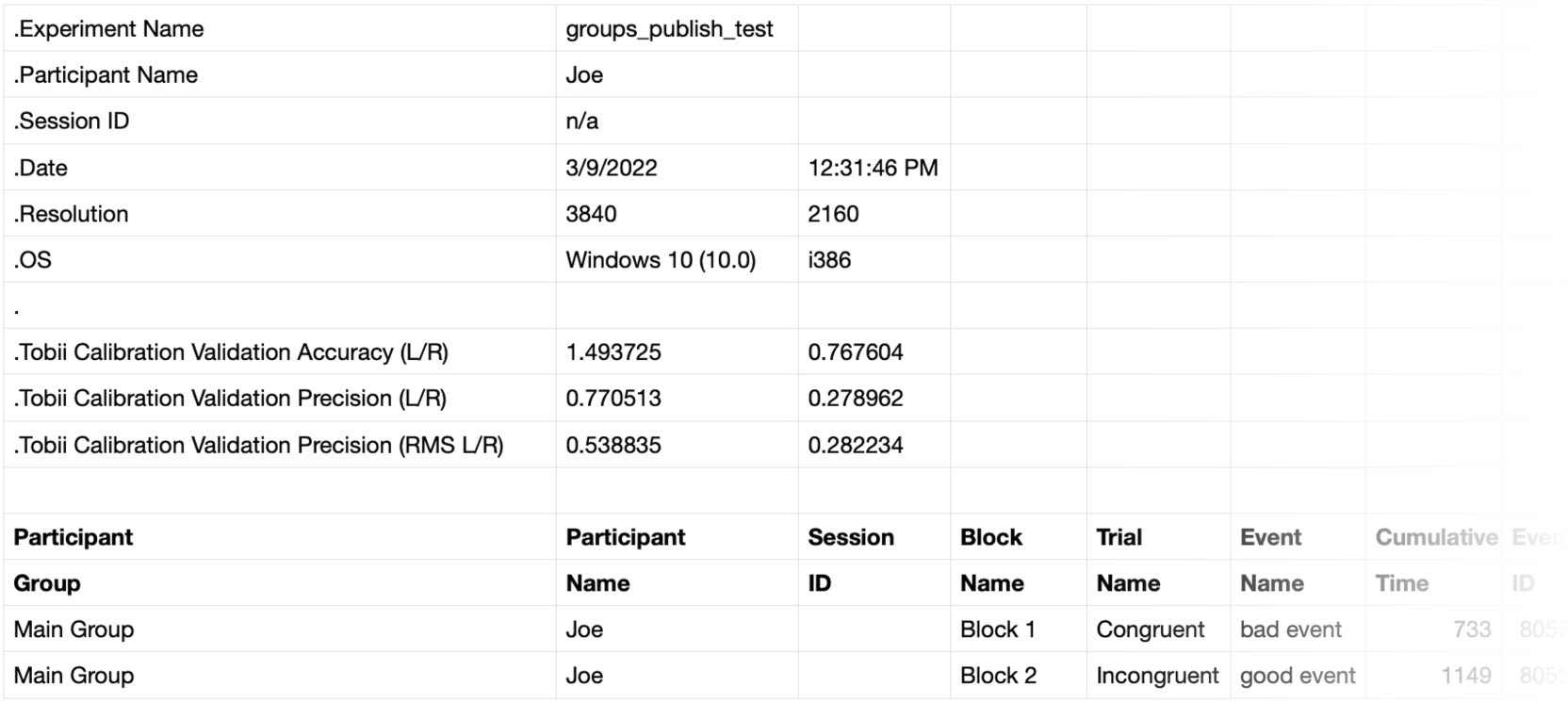
‍The file format produced by SuperLab version 6.2 or later consists of:

  • A file header.
  • A data header that describes the columns of data of data that follow.
  • The actual data.

‍The file header and data header are always separated by a blank line.

‍File Header Details

‍A line in the file header always starts with a period (dot) followed by a keyword. Here is description of all keywords:

  • Experiment Name, followed by one field; this is the experiment’s file name.
  • Participant Name, as entered when you run the experiment, or “n/a” if no name is entered.
  • Session ID, as entered when you run the experiment, or “n/a” if none is entered.
  • Date, followed by two fields to indicate the date and time.
  • Resolution, followed by two fields to indicate the width (X) and height (Y) in pixels of the display.
  • OS, followed by two fields that indicate the operating system and the processor (CPU).

‍The following keywords apply only to SuperLab X6 when using a Tobii eye tracker:

  • Tobii Calibration Validation Accuracy (L/R)
  • Tobii Calibration Validation Precision (L/R)
  • Tobii Calibration Validation Precision (RMS L/R)

‍Please see the Tobii documentation for information on interpreting these numbers.

‍A Tip for Parsing The Data File

‍Cedrus expects that more keywords will be added to the file header in future versions of SuperLab. If you are writing software to parse the data file, we suggest that your code not look for a fixed list of keywords. Instead:

  • Look for a period at the beginning of each line.
  • Get the keyword that follows the period. If your code does not recognize or care for the keyword, then simply ignore the rest of the line.
  • If the next line does not start with a period, then you have finished parsing the file header.

‍This approach will make your code more future-proof regardless of how many new keywords get added to the file header.

‍File Format Prior to SuperLab 6.2

‍In SuperLab releases prior to version 6.2, the header always consisted of three lines:

  • The participant’s name, as entered when you run the experiment; this line is blank if no name is entered.
  • The experiment’s file name.
  • The date, following by a tab, followed by the time.


Arrow Back Back to SuperLab Support main page
Last Revision: March 22, 2022

File

Header

Data

Header

PRODUCTS

SUPPORT

STAY IN TOUCH

© Copyright 2026 Cedrus Corporation, P.O. Box 6309, San Pedro, CA 90734 - USA

Phone: +1-310-548-9595. Send us an email Envelope. See privacy policy.

qwerasdf