Most issues that our customers run into boil down to one thing: the correct USB driver not being installed. Before proceeding, make sure that all the DIP switches next to the USB connector are in the down position.
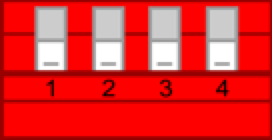
PsychoPy includes Cedrus’ own pyxid library and requires the Virtual COM Port (VCP) driver in order to work. Follow the instructions on this page to download and install the driver:
You will need the Mac’s Terminal program.
•
Open the Terminal program.
•
In Terminal, type the command:
This command will show a list of all available serial port devices.
ls /dev/cu.*
•
•
With your RB response pad (or Lumina, or StimTracker) connected to the computer, look for a listed device with something like “usbserial-xxxx” in the name, e.g. “/dev/cu.usbserial-00005014”. If present, then a USB driver is installed.
We still need to verify that this is the USB driver for the Cedrus device and not something else. To do so, unplug the response pad and type the “ls /dev/cu.*” command again. The USB driver should no longer be listed. If it is, then you have some other serial device connected.
We have written a small Python snippet that does not use pyxid and uses pyserial directly. It looks for the serial port, opens it, sends a command to verify that it’s an XID device, and then closes the serial port. The snippet should be used with PsychoPy Coder. You can open Coder by going to View menu and choosing Open Coder View.
The test program will generate output similar to:
Looking for XID devices...
XID Candidates: ['cu.usbserial-0000202']
Trying port: Serial<id=0x1015f5090, open=False>(port='/dev/cu.usbserial-0000202', baudrate=115200, bytesize=8, parity='N', stopbits=1, timeout=None, xonxoff=False, rtscts=False, dsrdtr=False)
Writing '_c1' to port
Read in '_xid0' from port
XID device found!
If the test program produces the “XID device found!” message, then this confirms that pyxid should be able to detect your response pad.
After you have tried to complete the steps above, please send us an email; we will do our best to help.
Last revision: Aug 22, 2017
PRODUCTS
SUPPORT
STAY IN TOUCH


© Copyright 2026 Cedrus Corporation, P.O. Box 6309, San Pedro, CA 90734 - USA
Phone: +1-310-548-9595. Send us an email
qwerasdf
