Cedrus logo

StimTracker Specifications

‍Light Sensor

‍The light sensor is available in two colors: black and white. Notches are molded in on three sides to allow for easy positioning on the screen.

  • Response time (dark to light): 0.05 milliseconds
  • Release time (light to dark): 4 milliseconds
  • Spectral sensitivity: 360-970 nm (visible light)

‍The response and release times are dependent on the amount of light.

‍The light sensor is small, measuring only 8mm (W) by 20mm (L) including the wire’s strain relief. It comes with a 2 meter cable (6ft) that has a 2.5mm mono jack. It can be extended.

‍Latencies

‍For best performance, all the inputs connect to the microprocessor using interrupts. The resulting latency is under 5µs between an event occurring and being registered and timestamped by the system. Assuming no further signal filtering, the output will appear on the m-pod output pin in less than 200µs and sent to the USB port is less than 100µs. The delays between input and output are:

  • Light Sensors
    Less than 0.01 milliseconds (this is the latency due to StimTracker and does not include the light sensor’s response time)
  • Audio
    Less than 0.05 milliseconds after voice level rises above threshold
  • Voice Key
    Less than 0.05 milliseconds after voice level rises above threshold
  • Response
    Less than 0.01 milliseconds

‍When StimTracker is generating event markers for more than one device:

  • Time delay between m-pods
    0 milliseconds
  • Time delay between m-pods and TTL output (Quad model only)
    0 milliseconds

‍USB Part 1: Hardware Latencies

‍The latency for sending an event code depends on the baud rate selected through the driver. At the recommended 115,000 baud rate, the three byte command needed for sending an event marker takes 0.36 milliseconds to transfer.

‍Once received, StimTracker processes the command and produces the output in less than 0.1 milliseconds.

‍USB Part 2: Software Drivers

‍For sending event markers via USB, software where the real bottleneck is.

‍The delay is 2ms, jitter-free when using:

  • Cedrus-provided C++ and Python pyxid2 libraries.
  • Off-the-shelf software that uses one of these two libraries, e.g. SuperLab or PsychoPy.

‍The delay is ±5 to 6 ms when using other software such as E-Prime.

‍WHY: StimTracker is compatible with two different USB drivers. The Cedrus-provided libraries use a high precision driver provided by the manufacturer of the USB interface chip used inside StimTracker. The other driver is less precise but can emulate a serial port; this makes it compatible with a wide range of software such as E-Prime.

‍Firmware Capabilities

‍Both StimTracker models offer these advanced built-in features:

  • Asynchronous Output
    With this capability, your software does not need to wait for the duration of the pulse before doing other things – it simply sends a command to StimTracker and moves on.
  • Time-Stamped USB Output
    StimTracker can be enabled to report time-stamped event markers via USB. You can select which input source will reset the built-in timer, e.g. on onset of visual or auditory stimulus, or by a command that you send via USB. You can also select which event markers information you want StimTracker to send via USB.
  • Signal Filtering
    The default StimTracker configuration will work for the majority of researchers. But when you need special signal handling, StimTracker has some unparalleled and nifty
    signal filtering options.
  • Pattern Generator
    If you need to control an external device, you can ask StimTracker to generate periodic pulses on specific output lines. While it’s doing so, StimTracker can continue to generate event markers on the other lines, including responding to commands that it receives from you via USB.
  • Scheduler
    A truly unique feature that’s best described by an example: you want to present a movie (or audio) and need to send event markers at specific points during the movie. With StimTracker, you can build an event schedule, e.g. send a 10ms pulse at T+200ms and a 15ms pulse at T+354. When the movie starts, you send a command via USB to run the schedule. StimTracker will then produce a 10ms event marker 200ms later, and another 15ms marker 354ms after receiving your command.
  • Pulse Offset
    With a custom cable and the scheduler feature, you can send a pulse to one device and a pulse to another device with a precise offset between the two.

‍Power Consumption

‍StimTracker uses a 9V power supply. Its plug has an OD of 5.5mm and ID of 2.1mm plug. It is center positive.

‍For StimTracker Duo and Quad, power consumption is 250mA. Each connected m-pod consumes an additional 50mA.

‍For Wireless StimTrigger, power consumption is 1,550mA.

‍Software Support

‍All the firmware features described above are supported by our C++ library. Some are supported by our Python and Matlab libraries as well, and we can add support for other features upon request. All libraries are open source and on GitHub.

‍The raw commands that StimTracker and m-pod accept are fully described.
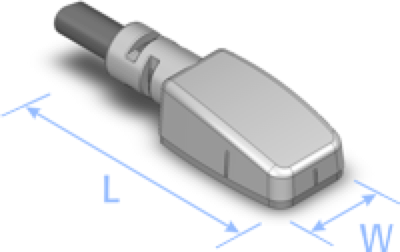
Dimensions of the Cedrus photosensor.

• 30 day money back guarantee
• 1 year warranty
• Free support
• Contact us for questions

Specifications

PRODUCTS

SUPPORT

STAY IN TOUCH

© Copyright 2026 Cedrus Corporation, P.O. Box 6309, San Pedro, CA 90734 - USA

Phone: +1-310-548-9595. Send us an email Envelope. See privacy policy.

qwerasdf
