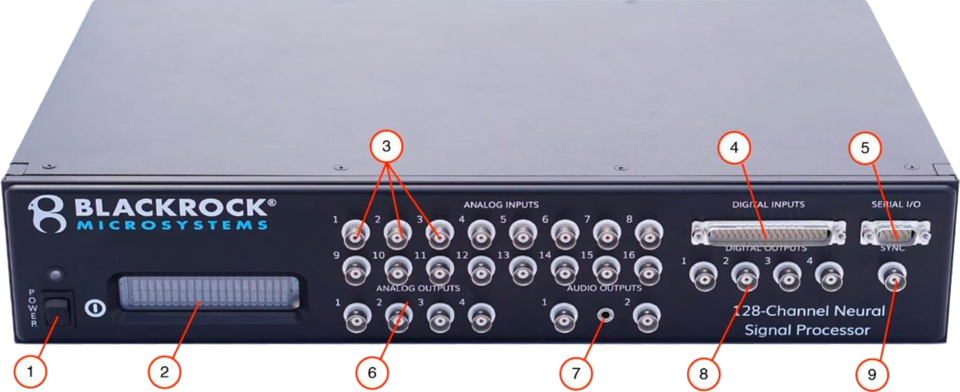
m-pod can send event markers to Blackrock NeuroPort via the “DIGITAL INPUTS” connector (number 4 in the picture). You need:
In addition to NeuroPort, this support note also applies to Blackrock Neurotech’s CerePlex Direct and Cerebus systems as they have the same DIGITAL INPUTS connector.
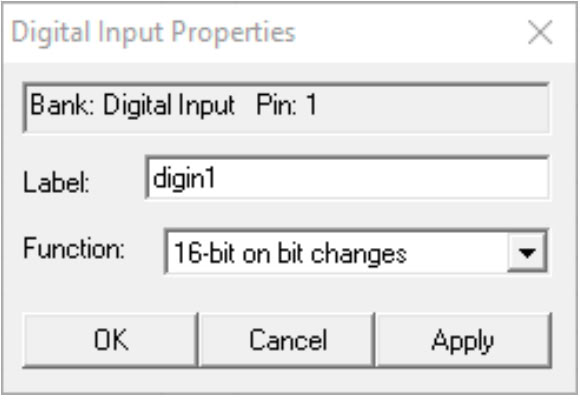
On the Hardware Configuration screen of Central, the Blackrock Neurotech software:
In the Digital Input Properties dialog, select the option “16-bit on bit changes”.
The DIGITAL INPUTS connector on NeuroPort has 37 pins and accepts 16 lines of input. m-pod for Biosemi uses the same connector and offers 16 lines of output, 15 of which align nicely with the input lines on the NeuroPort. This leaves one m-pod output line that cannot be used with NeuroPort: line 0 is not available.
We highly recommend that you adjust the signal mapping so that no signals are assigned to output line 0.
Last Revision: May 22, 2025
PRODUCTS
SUPPORT
STAY IN TOUCH


© Copyright 2026 Cedrus Corporation, P.O. Box 6309, San Pedro, CA 90734 - USA
Phone: +1-310-548-9595. Send us an email
qwerasdf
